
Most WordPress database problems do not show up on the homepage.
That is what makes them easy to miss. The site can load, the contact form can work, the admin dashboard can open, and from the owner’s perspective everything seems fine enough. Then something heavier runs, like a backup, migration, plugin update, product import, export, or report, and suddenly the site starts timing out, throwing errors, or exhausting memory.
That is usually when the real condition of the site shows up.
This is especially common with inherited WordPress sites. A site passes through a few hosts, a few plugins, maybe a redesign or two, and the database keeps carrying the history. The owner sees pages, products, forms, and posts, but underneath that are revisions, form entries, order records, session data, security logs, SEO plugin tables, page builder metadata, and sometimes old plugin tables that no one has reviewed in years.
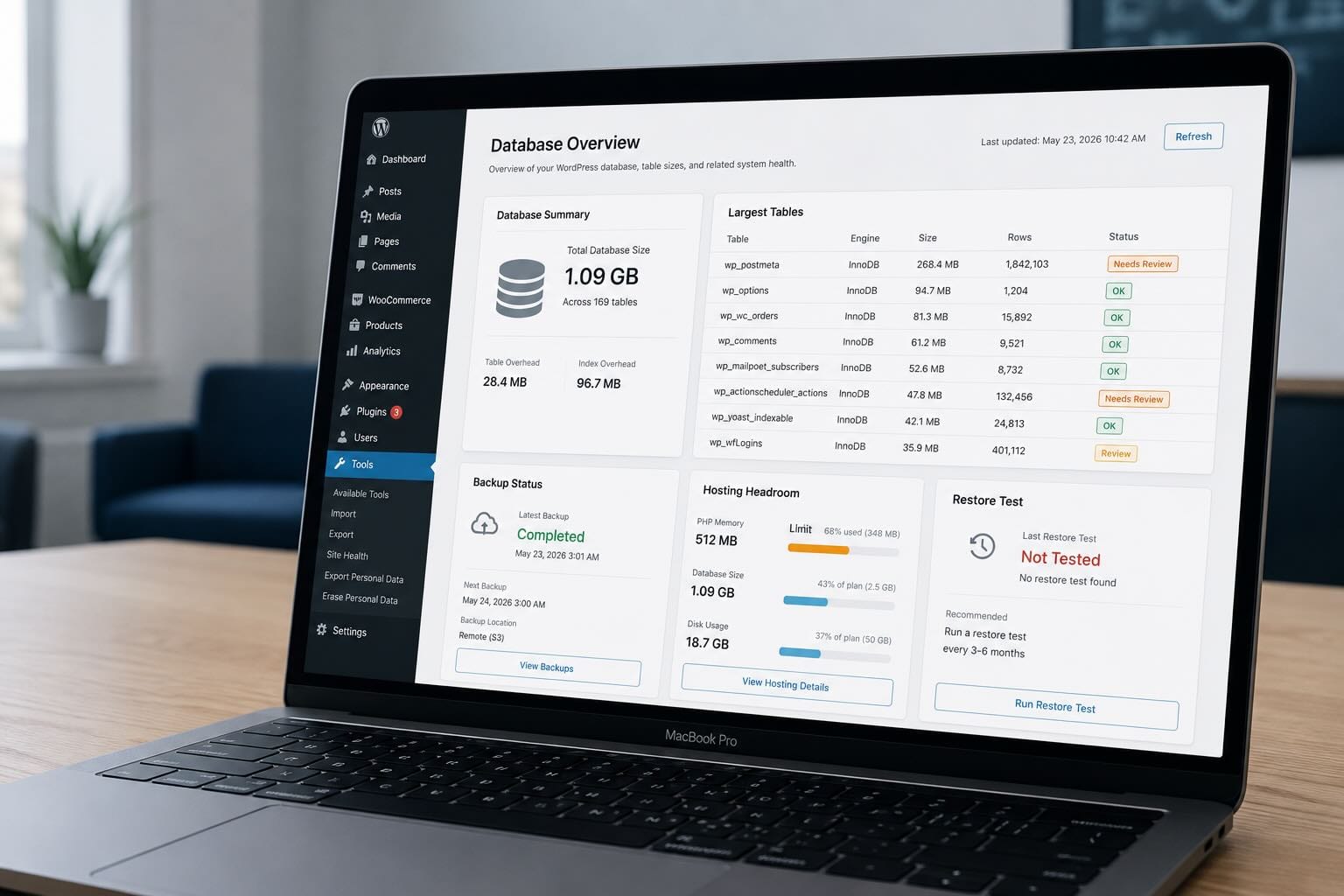
I have seen individual WordPress database tables grow past 250 MB before the owner had any reason to know they existed. That size is not automatically a disaster, but it changes the operating assumptions. A table that large may be fine on a properly managed server with enough memory, tuned backups, and a known recovery process, but it can become a problem on a constrained hosting plan where backups and maintenance jobs are just running on autopilot.
The important part is that database problems usually do not announce themselves during normal browsing. They show up when the site has to do heavier work, like creating a backup, migrating hosts, exporting data, generating reports, or running certain plugin updates. That is when the difference between “the site loads” and “the site is healthy” becomes obvious.
WordPress hosting is not just where your site lives, it is the environment your database, backups, plugins, cache, admin tasks, and recovery process all have to survive inside.
WordPress gets heavy in boring ways
WordPress rarely becomes a mess all at once. It gets heavier slowly, usually through normal business activity.
A few years of post revisions, page builder data, form entries, WooCommerce orders, abandoned carts, security logs, SEO plugin records, backup history, expired temporary data, and old plugin tables can add up fast. None of that sounds dramatic, and most of it exists for a reason, but if nobody is reviewing it, the database becomes a junk drawer with business-critical data mixed in.
That is what makes cleanup dangerous. You cannot just open the database, sort by size, and delete whatever looks annoying. A large table might contain valid order history, customer records, product metadata, form submissions, or page layouts. It might also contain four years of plugin logs nobody needs. The work is figuring out which is which before touching anything.
This is one of the reasons older WordPress sites can be fragile even when they look normal. The visible site may have been redesigned, polished, and updated, while the database underneath is still carrying years of decisions from previous developers, hosts, themes, and plugins.
“Working” is not the same thing as healthy.
Backups are not passive
A lot of owners think of backups as a checkbox, either they are enabled or they are not. That is too shallow.
A backup is an actual workload. It has to read the database, collect files, compress data, write temporary archives, and often push those archives somewhere offsite. Depending on the setup, that process may run through WordPress and PHP, which means it has to fit inside the server’s memory limits, execution limits, CPU availability, disk speed, and cron behavior.
On a small site, that is usually fine. On a site with a large database, years of media, heavy plugins, and cheap hosting, the backup may be one of the most demanding things the site does all week.
So when backups fail, run forever, or trigger memory errors, I do not treat that as a minor plugin issue. I treat it as a warning that the site’s operating model needs review.
The warning might be that the database has grown past what the plan can comfortably handle, that backups are running at the wrong time, that temporary files are filling storage, that old plugin data needs cleanup, or that the hosting environment simply does not have enough headroom. More importantly, it might mean the site has backups in theory, but no tested recovery plan in practice.
Automatic backups are not the same as recoverability.
Shared hosting is fine until it is not
Shared hosting is not automatically bad, and pretending otherwise sounds like fear-based selling. For a small brochure site with light traffic, a few pages, basic forms, and minimal plugin complexity, shared hosting can be a reasonable choice. It is cheap, simple, and good enough for plenty of sites.
The problem is that shared hosting usually gives you limited control over the things that matter when WordPress starts getting heavier: memory, database performance, cron reliability, caching rules, logs, backup timing, server-level snapshots, and resource isolation. You are also sharing infrastructure with other sites, which can be fine on a quality host and painful on a cheap one.
The bigger issue is not always the shared server itself, it is the lack of visibility. When something breaks, the owner often gets bounced between the host, the developer, the plugin vendor, and whoever last updated the site. One person says upgrade the plan, another says disable plugins, another says contact the host, and nobody is actually responsible for the whole system.
That is the point where hosting stops being a product decision and becomes an operations problem.
If your site is basically an online brochure, that may be acceptable. If it brings in leads, processes orders, supports ads, handles bookings, sends customer emails, or affects how people judge your business, the “cheap and good enough” calculation changes.
A VPS gives you control, not automatic competence
A VPS can be the right move, but not because “VPS” is a magic performance label.
A VPS gives you more isolation, more predictable resources, more control over caching, better access to logs, more flexibility with backup strategy, and more room to tune the environment around the actual site. For a serious WordPress site, especially WooCommerce or anything with a lot of database activity, that control matters.
But a poorly managed VPS is not better than good shared hosting. It is just a server with nobody watching it.
Someone still has to patch it, secure it, monitor it, configure backups, test restores, tune caching, check disk usage, review database growth, and understand what happens when maintenance jobs run. Moving to a VPS does not remove responsibility, it increases the need for someone competent to own it.
That is why I do not like framing this as “shared hosting vs VPS” by itself. The better comparison is unmanaged hosting vs managed operations.
A site does not need a VPS because it is trendy, it needs a better operating environment when the workload, business risk, or recovery requirements justify it. If you are starting to wonder whether your WordPress site has outgrown shared hosting, that is usually a good time to have the setup reviewed. We can look at the database, backups, hosting limits, caching, and recovery process, then tell you whether a managed VPS actually makes sense or whether cleanup on the current host is enough.
If that sounds like where your site is headed, schedule a website assessment and we can walk through the options with you.
Database management is website management
Database management sounds like a backend technical thing, but for WordPress it is part of basic website ownership.
A practical review should answer questions like which tables are largest, why they are large, which ones are business data, which ones are plugin leftovers, how long backups take, where backups are stored, when the last restore test happened, whether revisions are limited, whether logs are rotating, whether temporary data is being cleaned, whether WooCommerce is storing expected data, and whether the hosting plan still matches the site.
That does not mean every site needs constant deep database work. It means the database should not be invisible until something breaks.
There is a major difference between a large WooCommerce orders table that represents valid business history and a large plugin log table that nobody has looked at in years. One may need to be preserved, backed up carefully, and included in a recovery plan, while the other may need retention limits or cleanup.
The goal is not to make the database tiny. The goal is to make it understood, intentional, and supportable.
What I would check first
If you manage your own WordPress site, start with the basics before you install another cleanup plugin or blame your host.
Check your total database size, then check the largest tables. Confirm whether backups completed successfully in the last week, when they run, where they are stored, and whether anyone has actually restored from one recently. Look at your PHP memory limit, storage usage, backup duration, and whether the admin dashboard feels slow during normal work.
Then ask the uncomfortable question: is the site on its current hosting plan because that plan still fits, or because nobody has reviewed it since the site was smaller?
Do not blindly delete tables, do not run aggressive database cleanup tools without a verified backup, and do not assume that “backup enabled” means “recovery handled.” That is how small problems become expensive ones.
If you do not know where to find those answers, that is exactly the kind of review we handle during a website assessment.
When it is time to consider managed VPS hosting
Managed VPS hosting starts to make sense when the website has become important enough that cheap hosting is no longer the right risk profile.
That might mean the site generates leads every week, processes orders, stores years of customer or content data, runs WooCommerce, depends on custom plugins, has slow or inconsistent backups, has a sluggish admin area, or cannot afford extended downtime. It might also mean the site has simply accumulated enough history that it deserves a real review instead of another round of plugin updates and hope.
Not every business needs expensive hosting. Most do not. But every business should know whether its hosting still matches what the site actually does.
A five-page site and a ten-year-old WooCommerce store should not be treated the same way. A site that gets one contact form submission a month and a site that supports daily operations should not have the same backup, database, and recovery plan.
The right setup is not the fanciest one, it is the one that matches the workload and gives the business a reasonable path to recover when something goes wrong.
The real issue is ownership
Most WordPress problems are not caused by one dramatic failure. They come from small maintenance gaps that compound over time, like old tables nobody reviewed, backups nobody tested, plugins nobody owns, and hosting that made sense three years ago but no longer fits.
That is why database health, hosting, backups, caching, monitoring, and recovery should be managed together. Separating them too much is how owners end up in the vendor blame loop, where every piece technically exists, but nobody is accountable for whether the whole system works.
Your WordPress database is not just a technical detail. It is part of your hosting plan, your backup plan, your performance plan, and your recovery plan.
If nobody is watching it, nobody really knows how much risk is sitting underneath the site.
How we can help
Thunblom Cloud Solutions helps small businesses manage the systems behind their WordPress websites, including hosting, backups, database health, caching, monitoring, security, and recovery planning.
If your site has been running for years, recently moved hosts, started failing backups, or just feels slower than it should, we can review the setup and give you a practical plan.
We will tell you whether your current hosting is fine, whether the site needs cleanup, or whether it is time to move to a managed VPS.